
Why this feels messy — and what to fix first
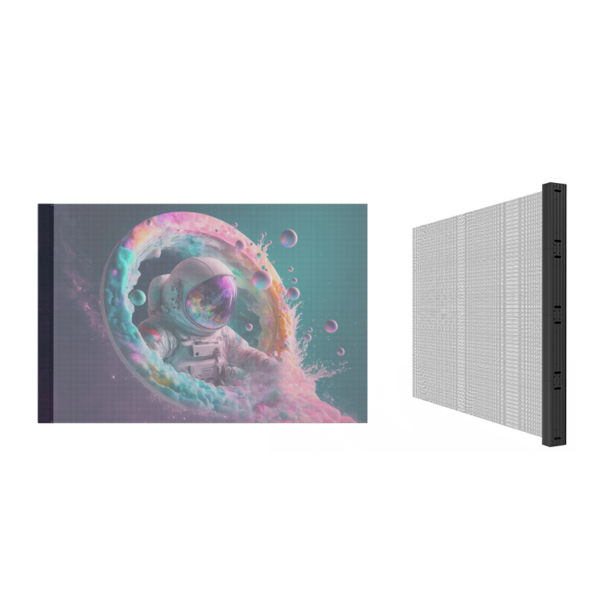
Buying an LED feels like stepping into a canyon of options: different pixel pitches, brightness specs, installation rigs, and baffling warranties. Start by naming the real problem you need solved — visibility at noon? seamless glass storefront integration? high-frame-rate sports? If you’re fitting glass-front retail or a showy façade, look at prototypes like a led transparent screen early. Call out the problem first; everything else becomes a tool, not noise.

Checklist item 1 — Define viewing goals and environment
Write down where people will stand, how far, and under what light. Short throw in a mall window needs tight pixel pitch (2–4 mm). A highway billboard needs huge brightness (8,000+ nits) and wider pitch (6–20 mm). Note direct sun, reflections from glass, and expected viewing angles. That list drives tech choices and price quickly.
Checklist item 2 — Technical must-haves: pixel pitch, brightness, and refresh
Pick pixel pitch by the closest viewing distance: roughly 1 mm per meter of distance is a working rule. Demand measurable brightness: state nits for peak and average. Ask for refresh rate specs and frame buffering — outdoor camera footage should show no flicker at 3,000 Hz or higher. Confirm contrast controls and local dimming if image depth matters.
Checklist item 3 — Weather, enclosure, and structural fit
Get the IP rating. IP65 is standard for outdoor faces; IP67 adds robustness against temporary flooding. Match housing materials to wind load and seismic constraints on your site. Insist on thermal specs for continuous operation: fans or passive vents, and what happens when temperatures hit extremes. If you’re mounting to glass, confirm dead load and glass reinforcement needs before ordering.
Checklist item 4 — Power, cabling, and redundancy
Demand full power schematics. Know per-square-meter wattage at 100% white and at typical usage. Ask how the system isolates faults — can one module fail without taking the whole screen down? Specify cable runs, surge protection, and whether the controller supports dual power feeds for redundancy.
Checklist item 5 — Content management and integration
Content drives perceived quality. Check if the controller supports your codecs, resolutions, and scheduling. Prefer systems with remote monitoring and real-time telemetry. Confirm CMS compatibility with existing networks and whether the vendor supplies plugins or APIs for your playback automation.
Checklist item 6 — Installation, maintenance, and service
Define who installs and who maintains. Ask for an installation plan with timelines, required scaffolding, and trade coordination. Get a maintenance SLA: response times, spare parts policy, and a clear escalation ladder. Photographic checklists and test patterns at sign-off are non-negotiable.
Checklist item 7 — Contracts, warranties, and acceptance tests
Write acceptance tests into the contract. Insist on measured test patterns: brightness at pixel level, dead pixel allowances, color calibration, and a continuous runtime trial period. Tie payment milestones to those tests. Clarify warranty coverage for LED modules, power supplies, and controllers separately.
Real-world proof without fluff
Big public installations expose weaknesses fast. Think Times Square — major façades and storefront pilots highlight why outdoor performance matters. For installations that need translucency and high visibility, an outdoor transparent led screen must meet light transmission and durability targets simultaneously; the same failures and fixes reported from high-traffic urban deployments apply here. That practical history guides realistic specs and procurement language.
Alternatives and common mistakes
People usually pick too-fine a pixel pitch, overpaying for a resolution nobody sees, or they underspec brightness and lose legibility at noon. Consider simpler options: opaque LED walls where transparency isn’t required, projection for temporary shows, or modular rental screens for seasonal needs. Always run a mockup — a taped grid on the glass or a small pilot module reveals problems early.
How to compare vendors fast
Make a short scoring sheet: environment fit (30%), technical proof (20%), installation plan (15%), warranties & SLA (15%), price & lead time (10%), references & case studies (10%). Ask for live demos under similar lighting. Check detailed drawings and request a site-specific bill of materials. Don’t accept vague promises.
Final pull: what to expect when it’s done
You want readable, dependable screens that integrate with your content loop and survive weather and time. Keep the acceptance tests, maintenance plan, and spare-part list front and center. If you want a practical partner who matches specs to site realities and owns installation details, consider long-term producers like HDC as a technical match rather than a pitch; they show up in drawings, telemetry, and test reports — the things that actually matter when the lights go on.